Video-to-Video editing with up to 2-minute outputs - that's the promise of Kling O1, now live on Kolbo.AI. This game-changing model transforms how we approach video editing and VFX, allowing creators to take existing footage and completely reimagine it without losing the original movement and camera angles.
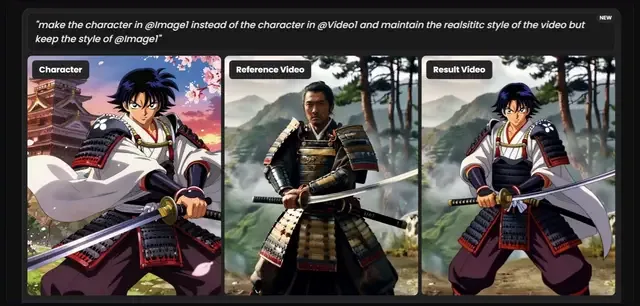
Kling O1 is a Video-to-Video model that enables complex transformations: swap characters, transfer artistic styles, apply VFX effects - all while preserving the original motion and cinematography. The model supports up to 4 reference images with smart tagging in prompts, allowing for precise control over how assets combine. The result? Professional VFX edits without the complexity of manual masking or frame-by-frame tracking.
What Makes Kling O1 Special
Video-to-Video Transformations
Take existing videos and completely reimagine them while keeping the original movement and camera angles intact. This isn't just style transfer - it's full creative freedom with perfect motion preservation. The model understands the underlying structure of your footage, allowing you to transform characters, environments, and styles while maintaining the cinematic integrity of the original shot.
Up to 2 Minutes @ 1080p/30fps
Generate longer, smoother videos with exceptional motion realism and physics simulation. Unlike shorter-form models that struggle with consistency over time, Kling O1 delivers professional-grade output for serious projects. The 1080p resolution at 30fps ensures your transformations look crisp and professional, whether you're working on commercial content, narrative projects, or experimental visual work.
Multi-Asset Smart Tagging
Attach up to 4 reference images plus your video, then use smart tags like @Image1, @Video1 in your prompts to control exactly how assets combine. This system eliminates guesswork - you tell the AI precisely which elements to reference and how they should interact. The model understands the relationships between your assets, making complex multi-asset transformations as simple as writing a natural language prompt.
Character Swap & Style Transfer
Replace characters in videos, transfer artistic styles, or transform realistic footage into animation - all while maintaining the original motion. This capability opens up entirely new creative possibilities. Want to see how a different actor would look in a scene? Swap them in. Need to transform live-action footage into an animated style? Kling O1 handles it while preserving every nuance of the original movement.
Native Audio Sync
Synchronized sound effects, music, and audio elements are generated automatically. This means complete audio-visual production in one pass - no separate audio editing required. The model understands the relationship between visual action and sound, creating cohesive productions that feel natural and professionally produced.
Smart Tagging in Action
The smart tagging system is what sets Kling O1 apart from other video-to-video models. Here's how it works:
Example Prompt:
"Replace the character in @Video1 with the character from @Image1, maintain the realistic style of the video but keep the appearance of @Image1"
The AI understands which assets to reference and how to combine them. No manual masking, no frame-by-frame editing - just precise control through natural language. You can reference multiple images and videos simultaneously, creating complex transformations that would typically require hours of manual work in traditional VFX software.
The tagging system allows you to:
- Reference specific images for character appearance
- Maintain style consistency across multiple assets
- Combine visual elements with precise control
- Create complex multi-asset transformations
Perfect For
🎬 VFX Artists & Video Editors
Apply complex VFX transformations without manual tracking or masking. Character replacement, style transfer, and effect application happen in one click. This dramatically reduces the time and cost associated with traditional VFX workflows, making professional-quality transformations accessible to smaller teams and independent creators.
🎨 Content Creators & Animators
Transform live-action footage into animation styles, or create unique hybrid looks. Experiment with creative transformations risk-free - no need to commit to expensive reshoots or lengthy post-production processes. The model enables rapid iteration, allowing you to explore multiple creative directions quickly.
📹 Video Producers & Agencies
Rapid prototyping for client pitches. Show multiple visual directions for the same footage without re-shooting. This capability is invaluable for agencies working with clients who need to see different creative approaches before committing to a final direction. Transform the same base footage into multiple styles, character variations, or visual treatments.
Why This Matters
Traditional VFX work requires expensive software, complex masking, frame-by-frame tracking, and hours of manual labor. A single character replacement might take days of work from skilled VFX artists, involving rotoscoping, motion tracking, and painstaking frame-by-frame adjustments.
Kling O1 handles all of that automatically. Upload your video, attach reference images, write a prompt with smart tags, and get professional VFX results in minutes. It's like having a VFX team without the cost or complexity. This democratization of professional VFX capabilities means that creators who previously couldn't afford or access these tools can now produce work that rivals what was once only possible with large budgets and specialized teams.
The implications extend beyond cost savings. The speed of iteration enabled by Kling O1 means creators can explore more creative directions, take more risks, and refine their work more thoroughly. What used to take weeks can now be accomplished in hours, fundamentally changing the creative process.
Getting Started
Kling O1 is live right now in Video Tools. To get started:
- Navigate to the Video section in Kolbo.AI
- Select Kling O1 from the model dropdown
- Upload your video and up to 4 reference images
- Write your prompt using smart tags (
@Image1,@Video1, etc.) - Generate and let the AI handle the rest
The model preserves the original movement and camera angles while applying your transformations, ensuring that the final output maintains the cinematic quality of your source material.
Use KOLBO30 for 30% off the first monthly subscription payment for eligible new customers. Annual plans and credit packs are excluded; confirm eligibility and renewal pricing at checkout.