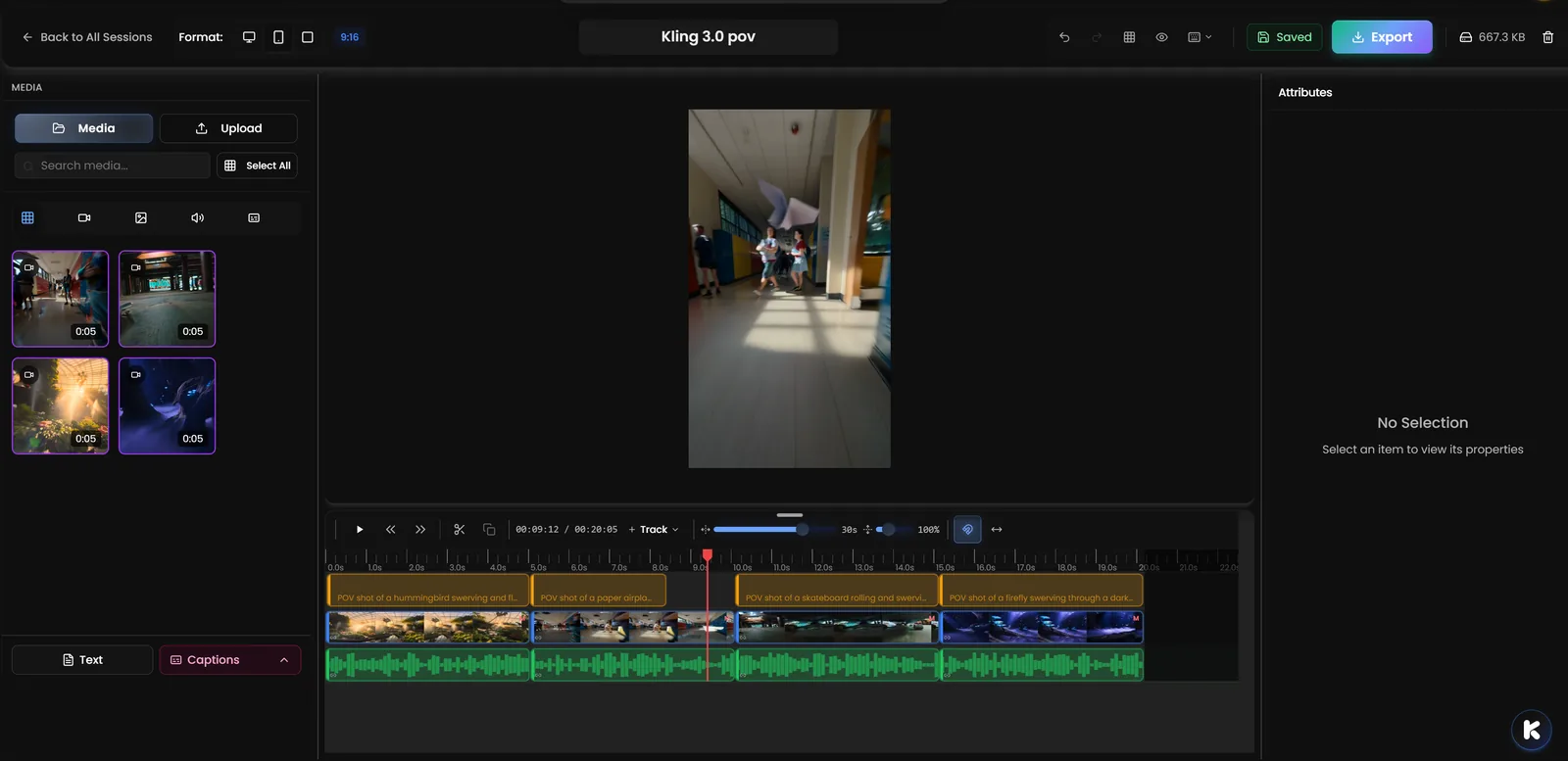
We've completely rebuilt Kolbo's Video Editor from the ground up. This isn't just an update - it's a total transformation that brings professional-grade video editing tools directly to your browser. No downloads, no installs, just powerful editing capabilities accessible from anywhere.
What's New
Refined Timeline with Drag-and-Drop Precision
The new timeline is completely redesigned with:
- Thumbnail previews for every clip - see what you're editing at a glance
- Multi-select clips to move, delete, or edit multiple elements at once
- Snap-to-grid alignment when dragging clips for pixel-perfect positioning
- No overlapping clips - intelligent placement prevents accidents
- Zoom controls (+/- keys) to see your entire timeline or focus on fine details
Auto-Captions: Automatic Subtitles
Generate subtitles automatically and they appear as fully editable, perfectly synced clips on your timeline. Edit text, timing, and styling just like any other element. Perfect for social media videos, accessibility, and engagement.
New Rendering Engine
Smoother previews, better playback performance, and support for all visual effects in real-time. The new rendering system delivers:
- Smoother playback with perfect audio-video sync
- Real-time effects preview without stuttering
- Faster export directly in your browser
Visual Effects Per Layer
Apply professional effects to any layer with granular control:
- Color Grading: Brightness, contrast, saturation, hue, temperature
- Motion: Zoom, pan, fade-in/out
- Blur: Selective or full-frame blur effects
- Transitions: Smooth fades and custom timing
Redesigned Property Panel
Four organized tabs for complete control:
- Clip: Trim, split, duration, speed
- Design: Text, overlays, graphics
- Effects: Visual and audio effects library
- Layout: Position, scale, rotation, flip
Audio Effects
Professional audio tools built-in:
- Fade in/out for smooth audio transitions
- EQ controls to adjust frequency balance
- Audio presets for common scenarios (podcast, music, voiceover)
- Waveform view for precise audio editing
Motion Presets
Apply professional motion graphics with one click:
- Camera movements (pan, zoom, dolly)
- Text animations (slide, fade, bounce)
- Transitions between clips
Keyboard Shortcuts
Work faster with industry-standard shortcuts:
- J/K/L: Playback speed control (backward/pause/forward)
- Ctrl+0: Fit timeline to window
- +/-: Zoom timeline in/out
- Left/Right arrows: Step frame-by-frame
- Space: Play/pause
Perfect For
Content Creators & YouTubers
Edit complete videos with pro-level tools - color grading, auto-captions, motion graphics, and audio mixing - all without leaving your browser.
Social Media Managers
Create polished vertical videos for Instagram, TikTok, and Reels with auto-captions, visual effects, and quick exports optimized for each platform.
Marketing Teams
Produce professional video ads and campaign content with precise editing controls, brand consistency, and fast turnaround times.
Educators & Trainers
Build engaging educational videos with automatic subtitles, clear audio, and professional presentation - no technical expertise required.
Why This Matters
Traditional video editing software requires expensive licenses, powerful hardware, and steep learning curves. Even browser-based editors often feel limited compared to desktop alternatives.
Kolbo's new Video Editor bridges that gap. You get professional-grade tools - timeline precision, auto-captions, visual effects, audio mixing - accessible from any browser, on any device. No downloads, no subscriptions to separate software, and no compromises on capability.
Get Started
The new Video Editor is live right now in Kolbo.AI. Open any video project and experience the complete overhaul - refined timeline, auto-captions, visual effects, and all the professional tools you need.
Use code KOLBO30 for 30% off your first month.