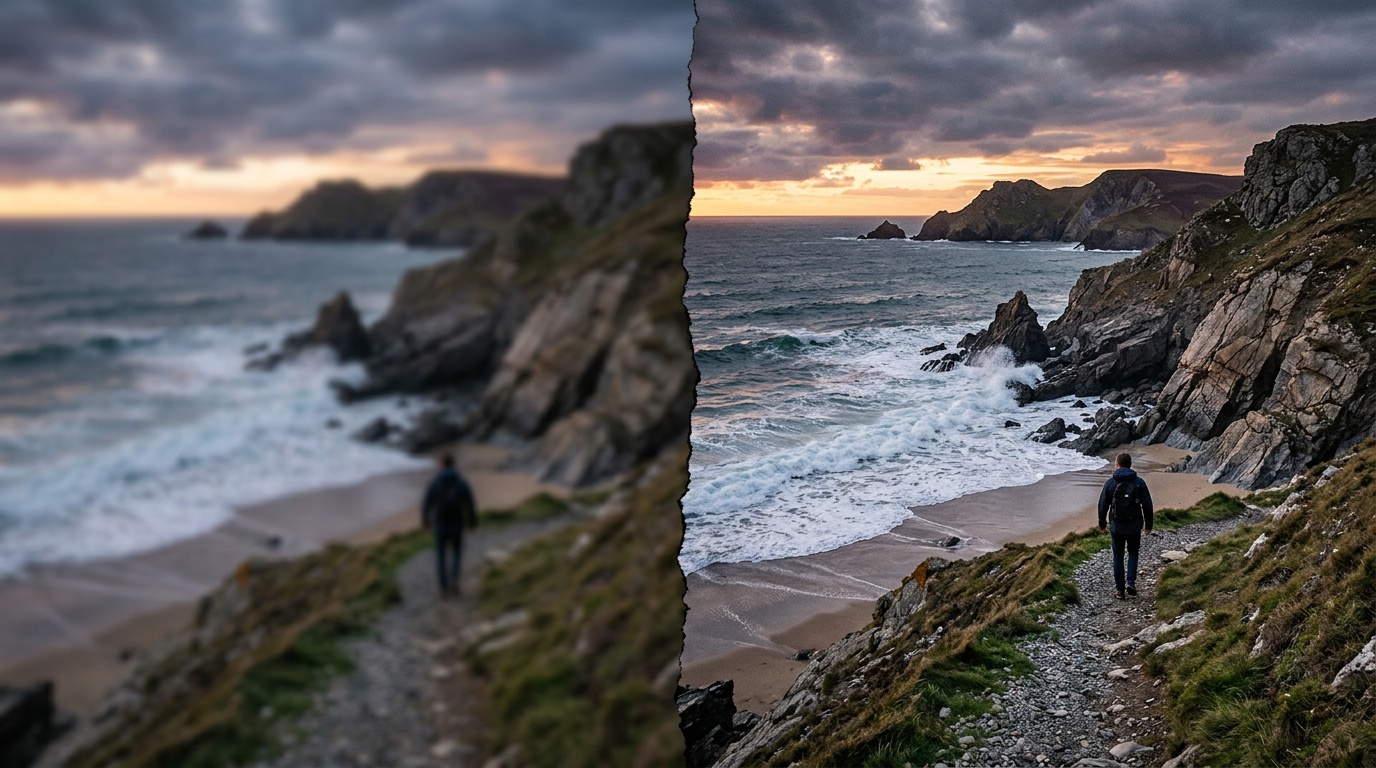
A client sends you a product photo taken on a phone. Width: 1,200 pixels. They want it on a billboard. A year ago you would have apologized and asked them to reshoot. Today? You run it through AI upscaling and deliver an 8,000-pixel file that looks like it was captured on a 50-megapixel camera.
AI-based image upscaling is one of the most practically useful tools to enter creative production in recent years, and not enough people understand the real difference between the two leading approaches. This guide compares Magnific AI and Topaz Photo AI, explains when to use each, and shows how to access both from one place.
Why Upscale Images in 2026?
The reasons all come from one of four situations:
- Large-format printing: billboards, A1 and A0 posters, wall-mounted prints. Modern printers require resolutions that phone cameras simply do not produce.
- High-resolution displays: 4K and 5K monitors enlarge every weak image into something visibly poor.
- AI-generated images: Nano Banana 2, GPT Image 2, and similar models typically produce at limited resolutions. For professional output at large sizes, that is often not enough.
- Legacy archives: images from older cameras, scans, low-resolution web assets.
Standard bicubic interpolation, the old method, averages adjacent pixels and produces a blurry result. AI upscaling does something fundamentally different.
Magnific AI: Generative Upscaling, Not Just Interpolation
Magnific AI launched in 2023 and made a significant impact for good reason. Its approach is meaningfully different from any upscaling tool that came before it.
How It Works
Magnific does not try to guess what is between the pixels. It invents the detail. It understands the context of the image (is this a face? A landscape? Fabric? Hair?) and adds textures and details that look real even when they were not there originally. This is generative upscaling: a diffusion model that synthesizes back into the image.
Why This Is Exciting
Take a Nano Banana 2 image at low resolution, upscale it 6x in Magnific, and you receive a 6,144 x 6,144 file with detail that looks like it was always there. Skin texture with depth, hair with dimension, fabric with individual fibers. This is not a claim. It is something you can see immediately.
The Significant Drawback
Magnific invents detail. In some cases that is exactly what you want: working with AI-generated images, visual concepts, illustrations. But if you have a photograph of a real person who was present in that moment, Magnific may change subtle details. Sometimes that does not matter. Sometimes it is a critical problem.
Topaz Photo AI: The Industry Standard for Photographers
Topaz Photo AI is a completely different tool at its core. Built by Topaz Labs, which has operated in this space since 2005, Photo AI combines three products in one: Gigapixel AI for upscaling, DeNoise AI for noise reduction, and Sharpen AI for sharpening, with a unified engine that decides what to apply based on the image.
What Topaz Does Differently
Topaz is about preserving reality, not inventing it. Its models are trained on tens of millions of real photographs and learn to identify: is this a face? Grass? Fur? A building? It then applies enhancements precisely suited to that type of content.
The result: the details that were in the image are preserved and clarified, not fabricated. A real person's eyes remain their eyes, not an "enhanced" version created by a generative model.
Why Professional Photographers Prefer It
Because they do not want AI making decisions about what "should" be in the image. They want the photograph they took, in that light, with those people, to reach the required size without losing its truth.
Direct Comparison: Four Image Types
Portrait (Human Face)
Topaz wins by a wide margin. It preserves the original facial characteristics: the specific person's face. Magnific may beautify, may subtly alter features, may smooth skin in ways you did not ask for. For a real person's portrait: Topaz.
Natural Landscape
Both work well, but differently. Topaz preserves the trees, rocks, and clouds exactly as they were. Magnific adds textural detail that can look richer. Sometimes this produces a stunning result, sometimes it is "too much." Depends on the intended use.
Product Image
Topaz is better in most cases. A product is a product: there is no room for invented detail. If there is a logo on packaging, Topaz keeps it sharp. Magnific may "add" a texture that was not there.
AI-Generated Image (Nano Banana 2 or GPT Image 2)
Magnific is in its home territory here. Because the image is already "invented," there is no "reality" to preserve. Magnific adds another layer of visual richness that looks organic to the image's existing style. The results are often remarkable.
When to Use Magnific
- Images you created with Nano Banana 2, GPT Image 2, or other generative models
- Creative work where you want to add visual richness
- Posters and graphic designs that do not contain real people
- When you need enormous resolution and having AI "invent" detail is a feature, not a problem
When to Use Topaz
- Photos of real people, sports, events
- Product images for catalogs and e-commerce
- Legacy archives you want to preserve and sharpen, not alter
- Any project where the truth of the original image matters
Accessing Both Through Kolbo.AI
Normally, using Magnific and Topaz requires:
- A Magnific AI subscription: starting at $39/month with image limits
- A Topaz Photo AI license: $199 for perpetual or around $99/year for subscription
- Managing two separate tools, two interfaces, two sets of files
Through Kolbo.AI you access both within a single platform, in a unified workflow, without managing multiple logins and subscriptions. The upscaling tools are available alongside your other AI creation tools: you can generate an image with Nano Banana 2, edit in Canvas, then upscale for print, all without leaving the interface.
For creators who work across AI image generation, editing, and output preparation, Kolbo removes the constant context-switching between platforms.
Practical Workflow: From Phone Photo to Billboard
Here is the step-by-step you can run today:
- Shoot with your phone. Even 12MP is a valid starting point.
- Upload to Kolbo.AI into your media library.
- Choose the upscaling engine: Topaz for regular photography, Magnific for AI-generated images.
- Upscale 4x to 8x. Topaz will produce a 48 to 96 megapixel file.
- Sharpen and adjust: Topaz Photo AI includes separate sharpness and noise reduction controls.
- Export as TIFF 16-bit for the printer, not JPEG, because JPEG adds compression artifacts at large sizes.
A photo that started as a 3MB phone file can end up as a 200 to 400MB file ready for an A0 format print.
Cost Comparison: Standalone vs. Kolbo
| Tool | Standalone | Through Kolbo |
|---|---|---|
| Magnific AI | $39 to $99/month | included in subscription |
| Topaz Photo AI | $99 to $199/year | included in subscription |
| Additional AI tools | separate per tool | all together |
If you are already using AI for images, video, and music, a Kolbo.AI subscription justifies itself even if upscaling is just 10 percent of your use.
The Bottom Line
Magnific and Topaz are not competitors. They are tools serving different needs. The common mistake is assuming the "newer" one (Magnific) is better than the "older" one (Topaz). That is not accurate. Magnific excels where you want generative richness. Topaz excels where you want precise preservation.
The professional who works with both and knows when to reach for each one is the professional who consistently delivers the right result.
Try Kolbo.AI for free and access both upscaling engines alongside 100+ AI models for images, video, music, and audio, all in one interface.