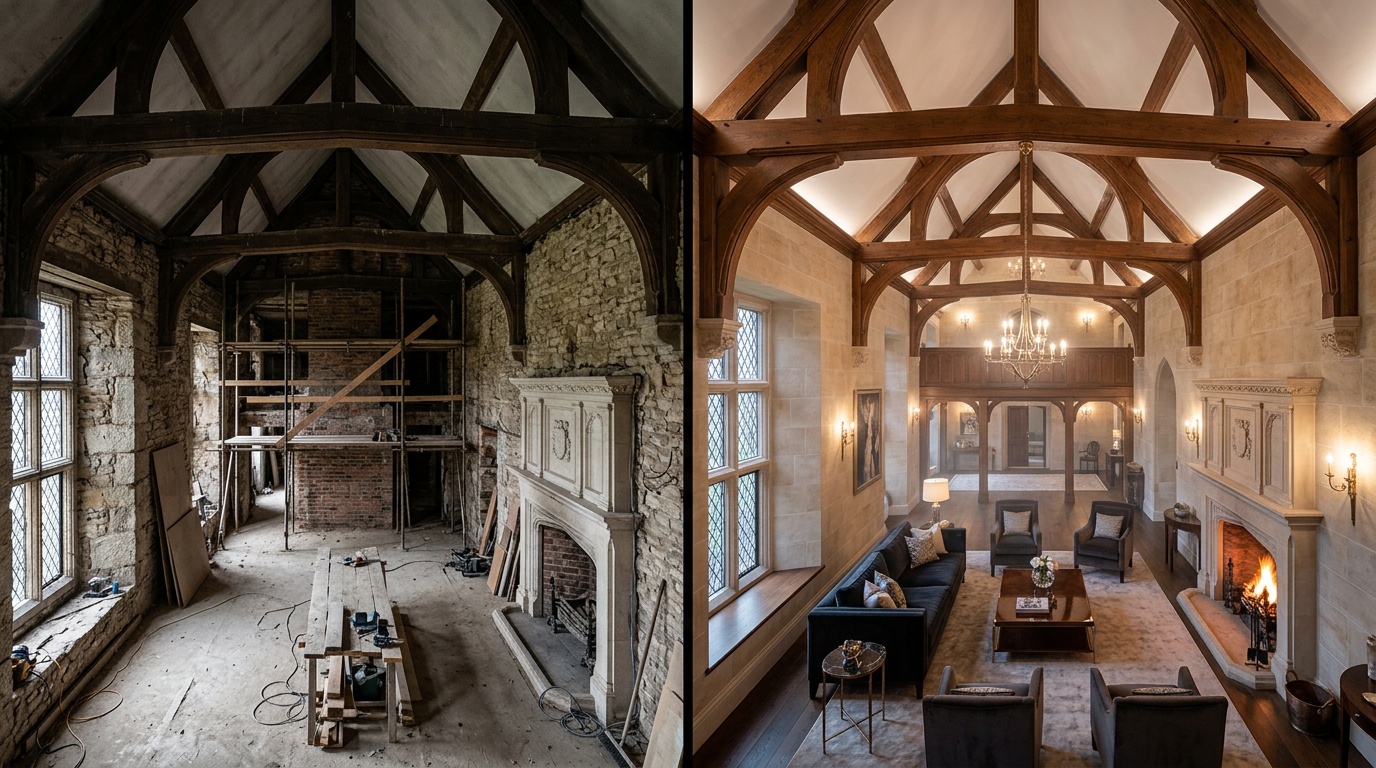
Real estate photography has a well-known problem: the camera never quite captures how a space actually feels. Rooms look smaller, lighting looks flat, and an empty apartment looks cold and uninviting even when the actual space is warm and well-proportioned.
AI tools in 2026 address this problem directly, across several distinct workflows. This guide covers each one: what it does, when to use it, and the practical and ethical boundaries that every professional should understand.
The Four Main Applications
1. Image Upscaling: From Good to Excellent
Property photos taken on a standard camera or even a professional DSLR often lack the resolution required for large-format print ads, billboard placement, or high-DPI digital displays.
AI upscaling addresses this by enlarging images while preserving and enhancing detail, not just stretching the pixels.
Through Kolbo.AI, two upscaling tools are accessible: Topaz Photo AI for photographs of real spaces (preserves reality, never invents), and Magnific AI for situations where additional visual richness is acceptable, such as architectural renders.
For real estate photography of actual properties: always use Topaz. It preserves what was actually there, including the real details of the space. Magnific could alter subtle details in a photograph of a real room in ways that would be misleading.
Practical use:
- An agent has a wide-angle interior shot at 2,400 x 1,600 pixels. The print publication requires 5,000 x 3,333. Topaz upscaling produces a clean, sharp result without a reshoot.
2. Virtual Staging: Furnishing Empty Rooms
Empty apartments do not sell well. Buyers struggle to visualize scale, flow, and livability in an empty room. Professional physical staging (renting and installing furniture) costs $1,000 to $5,000 per property and takes days to set up.
Virtual staging with AI places furniture, rugs, artwork, plants, and lighting into photos of empty rooms. The result: a fully furnished lifestyle image delivered in hours, not days.
The workflow in Kolbo.AI:
- Upload the photo of the empty room
- In the Canvas AI tool, use inpainting or the prompt interface to describe the desired furnishing
- Specify the style: "modern Scandinavian," "warm mid-century," "clean contemporary," "luxury minimal"
- Generate variations until one matches the target buyer profile
- Compare empty and staged versions side by side for the listing
What works well: living rooms, bedrooms, dining areas, open-plan spaces.
Where it requires more care: kitchens and bathrooms are harder because existing fixtures (counters, appliances, tile) constrain what can be staged, and consistency with permanent elements is critical.
3. Sky Replacement and Exterior Enhancement
Exterior shots taken on an overcast day look flat and uninviting compared to the same property photographed in golden hour light. The problem: the photographer cannot reschedule a listing shoot every time it is cloudy.
AI sky replacement swaps the sky in an exterior photograph, replacing gray overcast with blue sky and clouds, or replacing a flat midday sky with a warm sunset. When done well, the result looks natural because the tool adjusts the light on the building to match the new sky's direction and color.
In Kolbo.AI: use the Canvas inpainting tool to select the sky area and replace with a prompt. More precise control than using a dedicated sky-only tool.
Ethical note for exterior shots: sky replacement is widely accepted practice in real estate photography because it represents how the property genuinely appears in good weather, which is its normal state. This is different from altering the property itself. Still, some regional associations and MLSs have specific rules. Check your local standards.
4. Architectural Renders: Visualizing What Does Not Yet Exist
The most powerful application for new developments, renovations, or commercial properties. Architectural renders let potential buyers or investors see a finished property before construction is complete.
Two approaches:
AI-enhanced concept rendering: take an architect's rough 3D model or a sketch and use AI to render it as a photorealistic image. The quality gap between a CAD wireframe and a polished render used to require specialist visualizers working for days. AI dramatically compresses that timeline.
Style variations from a reference: you have photos of one finished apartment in a building and need to visualize other units in different finishes or color schemes. Use Kolbo.AI image editing tools to generate variations: the same layout with warm wood floors versus polished concrete, with white walls versus warm grey.
For new developments: generate renders of the lobby, amenities, and typical unit from the architectural drawings or early 3D files. These renders go into brochures, investor decks, and marketing websites before a single unit is built.
Practical Workflow: Listing an Empty Apartment
Here is a complete workflow for a standard listing with an empty space.
Materials needed:
- Professional photos of the empty space (minimum 4,000 x 2,700 pixels, RAW preferred)
- A brief on the target buyer (young professional, family, luxury investor)
Step 1: Upscale if needed Upload photos to Kolbo.AI. If resolution is below print standard for any ad placements, run Topaz upscaling first.
Step 2: Virtual stage the living room and master bedroom These are the two rooms that most affect perception of the property. Use Kolbo.AI Canvas for each:
- Input: empty room photo
- Prompt: "[target style] furnished interior, natural daylight, real estate photography"
- Generate 3 variations, select the strongest
Step 3: Sky replacement on exterior shots If exterior shots have poor sky, replace in Canvas with "bright summer sky, white clouds, afternoon light" or "warm sunset sky, golden hour." Check that the building lighting looks consistent with the new sky.
Step 4: Prepare listing set
- Main listing photo: the most impressive interior or exterior shot
- Gallery: staged living room, staged bedroom, kitchen (unstaged if clean), bathrooms, exterior, floor plan
- Feature image for social ads: the staged living room at high resolution
Total time: 2 to 4 hours for a standard two-bedroom apartment listing. Traditional staging: 3 to 5 days.
Mandatory Ethics and Disclosure
This section is not optional. AI-enhanced real estate imagery operates in a regulated industry where misrepresentation carries legal consequences.
Clear rules for what is acceptable:
Acceptable (widely practiced, no disclosure usually required):
- Sky replacement that represents normal weather
- Upscaling that sharpens existing detail without adding or removing elements
- Virtual staging that adds furniture to an empty room, as long as it is clearly labeled
Requires explicit disclosure:
- Virtual staging of any kind: label the image "Virtually Staged" or "Virtually Staged - Unfurnished"
- Architectural renders of unbuilt properties: label as "Artist's Impression" or "Rendered Visualization"
- Any image that shows a space in a condition different from its current state
Unacceptable:
- Removing structural elements that exist in reality (a load-bearing column, low ceiling)
- Adding windows or space that does not exist
- Replacing or removing neighboring buildings from exterior shots
- Any alteration that affects a buyer's understanding of the actual physical property
The guiding principle: AI can present a property in its best authentic light. It cannot represent a property as something it is not. When in doubt, disclose.
Prompt Templates for Real Estate
Virtual staging: "Luxurious contemporary interior design, spacious open-plan living area, warm natural light from the windows, high-end minimalist furniture, clean lines, white walls, real estate photography style, professional interior shoot"
Sky replacement: "Bright blue sky with soft white clouds, afternoon summer light, dramatic but natural, high dynamic range"
Architectural render: "Modern residential building exterior, high-end materials, professional architectural photography, photorealistic, golden hour lighting, landscaping in foreground"
What AI Cannot Do (Honestly)
Improve a fundamentally small space. AI can stage it beautifully and upscale it to print quality. It cannot make a 45 sqm apartment look like 80 sqm.
Eliminate bad architecture. Low ceilings, poor layout, awkward proportions: these are real. A skilled photographer (and AI enhancer) can minimize them. They cannot disappear them.
Replace a professional photographer. AI enhancement starts from a quality source image. Photos shot with a wide-angle lens at f/8 in good lighting give AI tools the best material to work with. Photos from a phone in dark rooms with no staging give AI less to work with, and the results reflect that.
The Bottom Line for Real Estate Professionals
The listing that shows the property at its honest best wins. AI real estate photography tools make "honest best" achievable for any listing, not just premium properties with full staging and photography budgets.
The complete toolkit: upscaling for resolution, virtual staging for empty spaces, sky replacement for exteriors, and architectural renders for new developments. All of these are available through Kolbo.AI in one interface, without managing separate service accounts for each.
Try Kolbo.AI free. Upload your first property photo and see the difference between a listing that performs and one that does not.