The Problem With "Just Describe the Style"
Getting a consistent, professional aesthetic out of an AI image tool used to require one of two things: either deep Photoshop expertise - layer masks, LUTs, blend modes, color grading curves - or an exhausting cycle of prompt trial and error. You'd spend ten minutes writing the perfect style description, generate five variations, and still not get the exact cinematic grade you had in your head.
Kolbo.AI solves this with two complementary preset systems that work at different stages of the creative process. One works at generation time; the other at editing time. Together they give you end-to-end control over the final look of any image.
Image Edit Presets - Polish Any Image in One Click
The Image Edit Presets live inside Kolbo's Image Editing tool. They are applied to an existing image - whether AI-generated or a photo you uploaded - and are organized into four focused categories.
Style
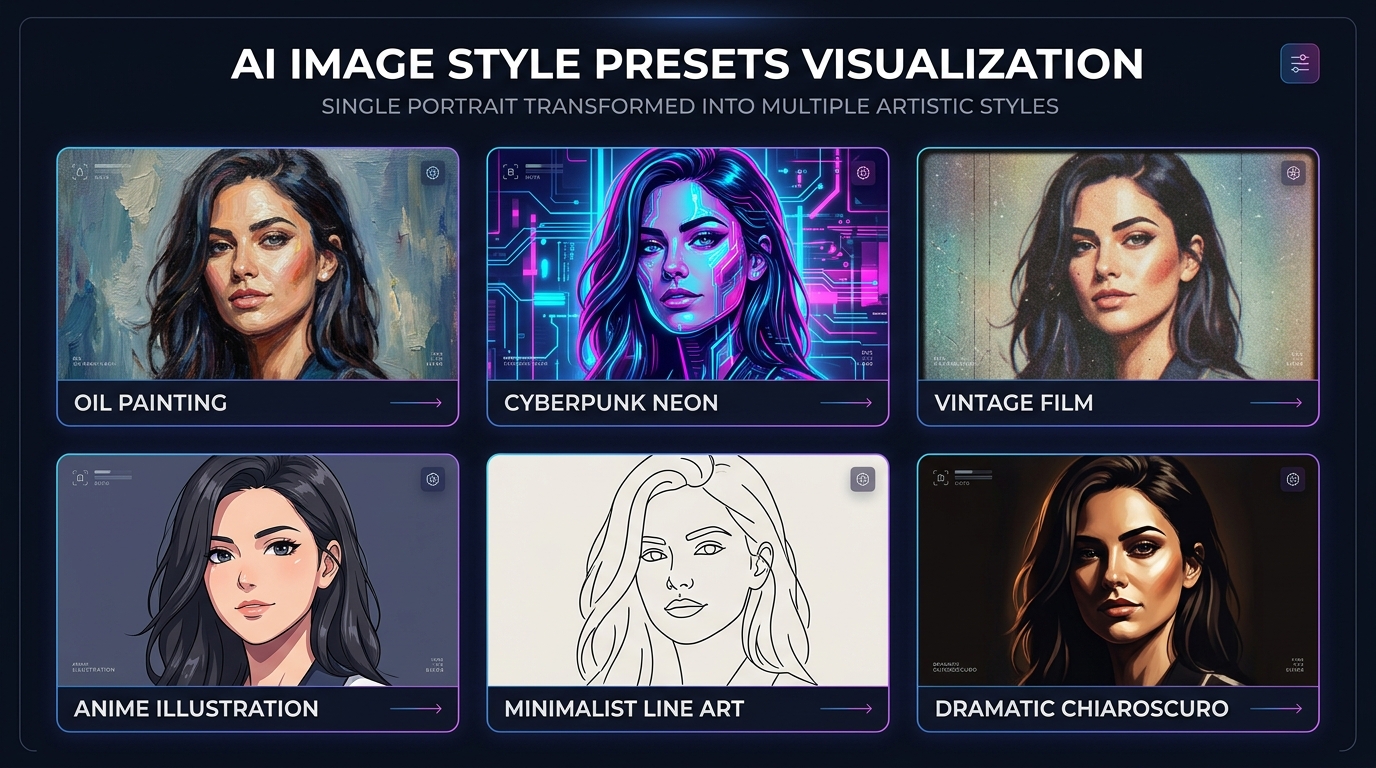
These presets transform the entire visual language of an image. Apply an Oil Painting preset to a portrait and the model renders visible brushwork, rich texture, and warm palette shifts. Switch to Neon Cyberpunk and the same portrait gets dark shadows, electric color bleeds, and a high-contrast urban glow. Cinematic Grade adds the teal-orange color split and lifted shadows you recognize from Hollywood color suites. Vintage Film introduces grain, faded highlights, and analog warmth.
Style presets are ideal for creative campaigns, mood boards, and social content that needs to look intentional rather than generic.
Enhancement
Enhancement presets improve technical image quality without changing the artistic intent. Color Enhancement lifts the vibrancy of muted or flat images. Sharpening recovers crisp detail in textures - useful when you upscale or when the source image has soft edges. Detail Recovery is particularly effective for AI images that lost fine detail during generation. Vibrancy pushes saturation selectively, making colors pop without blowing out highlights.
These are the presets you reach for when the composition is right but the output just needs polish before publishing.
Camera Control
Camera Control presets adjust the spatial and optical properties of an image: Bokeh Depth of Field softens the background to simulate a fast prime lens; Perspective Adjustment corrects converging verticals for architectural shots; Framing guides the compositional crop to emphasize the subject. These are practical for product shots and portraits where the original image was generated with the wrong implied focal length.
Layout
Layout presets handle compositional structure: Rule of Thirds Positioning shifts subject weight to align with the grid; Cropping Guides trim the frame for specific aspect ratios (stories, feed posts, print formats). For teams producing content across multiple platforms from a single source image, Layout presets reduce the manual work of reformatting by a significant margin.
All four categories are fetched dynamically - the Kolbo team curates and expands the preset library regularly, so the options grow over time without requiring any app update.
Higgsfield Style Presets - Bake the Aesthetic at Generation Time
The second preset system operates one stage earlier: at image generation. When you use the Higgsfield Soul model inside Kolbo's image generation tools, you have access to a dedicated style preset library that shapes the output at the model level rather than as a post-processing pass.
This is a meaningful distinction. A style baked into generation is part of the image's foundational structure - the lighting, the color science, the rendering language - rather than a filter applied on top. The result tends to be more coherent and harder to achieve with prompts alone.
Text-to-Image Mode
In text-to-image mode, you write a prompt and select a Higgsfield style preset before generating. Cinematic presets add dramatic lighting ratios and film-grade color. Editorial presets give the output the clean, high-key look of a fashion or tech magazine. Artistic presets - charcoal, ink wash, concept art - shift the rendering toward illustration rather than photography. The preset does not override your prompt; it collaborates with it.
Image-Reference Mode
In image-reference mode, you upload a reference image and the model uses it for compositional or subject guidance. The Higgsfield style presets still apply on top of that reference, so you can take a product photo from your library, reference it for subject accuracy, and apply a cinematic editorial look - all in a single generation step. This is powerful for brand work where the product must stay recognizable but the aesthetic needs to shift for a campaign.
The Combined Workflow
The two systems are designed to complement each other:
- Generate your base image using Higgsfield with a style preset that sets the foundational aesthetic.
- Refine the result in the Image Editing tool - apply an Enhancement preset to sharpen detail, a Camera Control preset to add bokeh, or a Layout preset to crop for your target format.
- Repeat with brand-consistent style presets across a batch to keep all assets visually unified.
This workflow compresses what used to take multiple tools - Midjourney, then Photoshop, then Lightroom - into a single platform session.
Who This Is For
Brand and marketing teams use style presets to maintain visual consistency across campaigns without briefing a retoucher for every asset. Select the same cinematic preset on every image and your LinkedIn posts, paid ads, and pitch deck visuals stay aligned.
Social media content creators use Enhancement and Style presets to give every piece of content a signature look - the visual equivalent of a preset pack in Lightroom, but applied to AI-generated images as well as uploaded photos.
E-commerce teams use Enhancement and Camera Control presets to polish product photography: sharpen textures, add depth of field to separate the product from its background, and crop for marketplace aspect ratios in one step.
Motion designers and art directors use Higgsfield style presets in image-reference mode to translate reference photography into a specific artistic direction before moving into video or animation production.
Try both preset systems today - and get 30% off your first Kolbo.AI subscription.
Use promo code KOLBO30 at checkout.
Professional image aesthetics used to be gated behind expensive software and years of technical skill. Presets change that equation - not by dumbing down the tools, but by packaging expertise into a form that any creative can apply immediately.
Start with one style preset on your next generation. See how much time it saves. - Zohar / Founder, Kolbo.AI