Kling by Kuaishou
Kling 3.0 and Kling O3 for realistic AI video.
Kling is Kuaishou’s video model family, strongest on believable people, natural motion and physical detail. On Kolbo.AI you get Kling 3.0, Kling O3, the Turbo tiers, Motion Control, avatars and lip sync in one workspace, billed from the same credits as every other model.
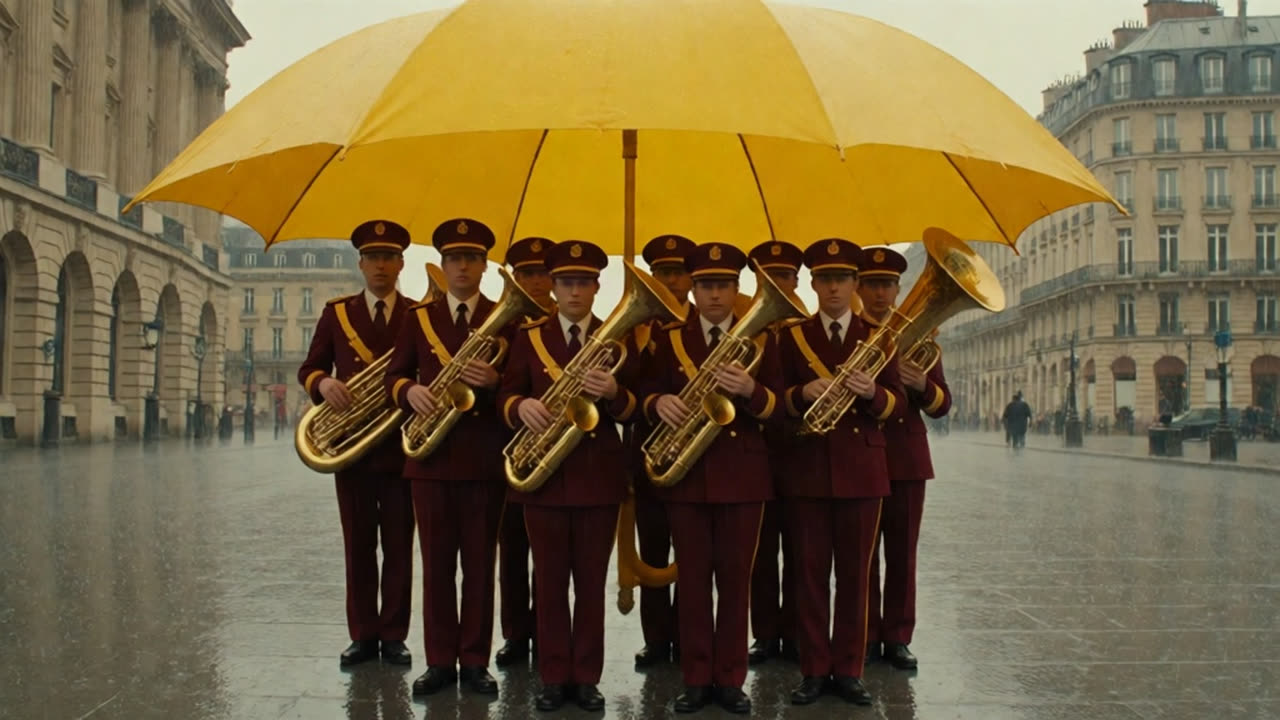
Made on Kolbo.AI with Kling 3.0 Pro
Prompt: Locked camera. The brass band performs one synchronized forward step and stops. Rain falls outside the giant umbrella while the musicians remain dry. Keep faces, hands, instruments and umbrella stable. One continuous shot.
Kling versions on Kolbo.AI
Standard renders 720p, Pro 1080p and 4K renders 2160p. Turbo tiers skip audio for faster, silent clips.
Kling 3.0
Text or image to video from 3 to 15 seconds, with native audio in English and Chinese and multi-shot sequences. Image mode supports first and last frame and Visual DNA; Standard and Pro text to video add voice control.
- Text to video
- Image to video
- First and last frame
- Native audio
- Multi-shot
- 3-15 s
Kling O3
Built for multi-cut scenes, physics and storyboards, in Standard, Pro and 4K. Native audio, first and last frame, and Visual DNA on image to video.
- Text to video
- Image to video
- First and last frame
- Native audio
- 3-15 s
Kling 3.0 Turbo
Turbo Standard at 720p and Turbo Pro at 1080p, 3 to 15 seconds, without generated audio.
- Text to video
- Image to video
- 3-15 s
Kling O3 Video Edit
Edit an existing clip in plain language: replace the background, change the lighting or restyle the scene while the motion stays.
- Edit a video
Kling Motion Control
Copy the movement from a reference video onto your character, in V3, V3 Pro, 2.6 and 2.6 Pro versions.
- Edit a video
Kling Avatar v2 and Lipsync
Turn a portrait and an audio track into a talking video, or sync the lips of an existing clip to new audio.
- Native audio
Getting the most out of Kling
Lock what must not move
Kling rewards precise prompts. Name the camera (locked, push-in, orbit), describe one clear action, and list what must stay stable: faces, hands, props and architecture.
Plan sequences with multi-shot
Kling 3.0 and O3 can render several shots in one 15-second generation, so a short ad or story beat arrives already cut.
Sound on, or off
Kling 3.0, O3 and 2.6 generate dialogue and effects with the picture. Turn sound off when you plan to score the clip yourself; the credit quote updates with your choice.
Go from still to 4K
Generate the key frame with an image model in the same project, then animate it with Kling 4K for 2160p delivery.
How it works
- 01
Pick a mode
Start from a prompt, a still image, a first and last frame, or a set of reference images in Video tools.
- 02
Choose the model and settings
Set duration, resolution, aspect ratio and sound. The credit quote updates with every change, before you generate.
- 03
Generate, compare, finish
Results land in your project. Run the same inputs on another model, then trim, upscale or edit in the browser.
What it costs
Kling is billed in credits per second of video. The rate depends on the version, resolution and whether sound is on, and the quote is shown before you generate. Current plans and credit examples are on the live pricing facts page.
Frequently asked questions
What is the difference between Kling 3.0 and Kling O3?
Both run 3 to 15 seconds with native audio, come in Standard, Pro and 4K, support Visual DNA on image to video and add voice control on Standard and Pro text to video. Kling 3.0 is the general cinematic model. Kling O3 is tuned for multi-cut scenes, physics and storyboards, and adds a natural-language video edit mode.
Which languages does Kling audio speak?
Kling native audio supports English and Chinese. For other languages, generate the clip and add a voiceover or lip sync in the same workspace.
Do I need a Kling subscription?
No. Kling runs inside Kolbo.AI on your Kolbo account, alongside Seedance, Veo and the other models, from one credit balance.
How much does Kling cost on Kolbo.AI?
Kling is billed in credits per generation. The amount depends on the version, duration, resolution and options such as sound, and the exact quote is shown before you generate. Current plans and credit examples are on the live pricing facts page.
Can I try it for free?
Yes. The Free plan includes a small monthly credit allowance so you can explore the workspace. Video costs more credits than images, so regular video work usually needs a paid plan or a credit pack. Purchased packs never expire.
Kling by Kuaishou
Put real motion into your next video.
Open Video tools with Kling 3.0 Pro selected, or switch to O3, Turbo or 4K from the model picker.