Kling 4.0 Flash is the fast version of Kling 4.0. It is built for the part of video work where you iterate: try a framing, check the motion, change the prompt, try again. It generates 720p video from 3 to 20 seconds long, and the audio is generated natively in stereo, so the picture and the sound arrive together.
In Kolbo.AI it works in four tools. For the full-size model, see our Kling 4.0 launch post.
Every clip below was generated in Kolbo.AI with Kling 4.0 Flash at 5 seconds, 720p, 24 fps, with generated stereo audio. Each one is shown with its prompt, and the clips that start from an input are shown next to that input.
Text to video
Describe the subject, the setting, the camera and the sound. Aspect ratios are 16:9, 9:16, 1:1 and 21:9.
Prompt: "A lone surfer carries a board along a foggy dawn beach, slow dolly follow, gulls and gentle surf sound, cinematic natural light". Text to video, 16:9, 5 seconds, 720p.Image to video
Give it a start frame and describe what moves. This clip starts from a frame taken from the text-to-video clip above.
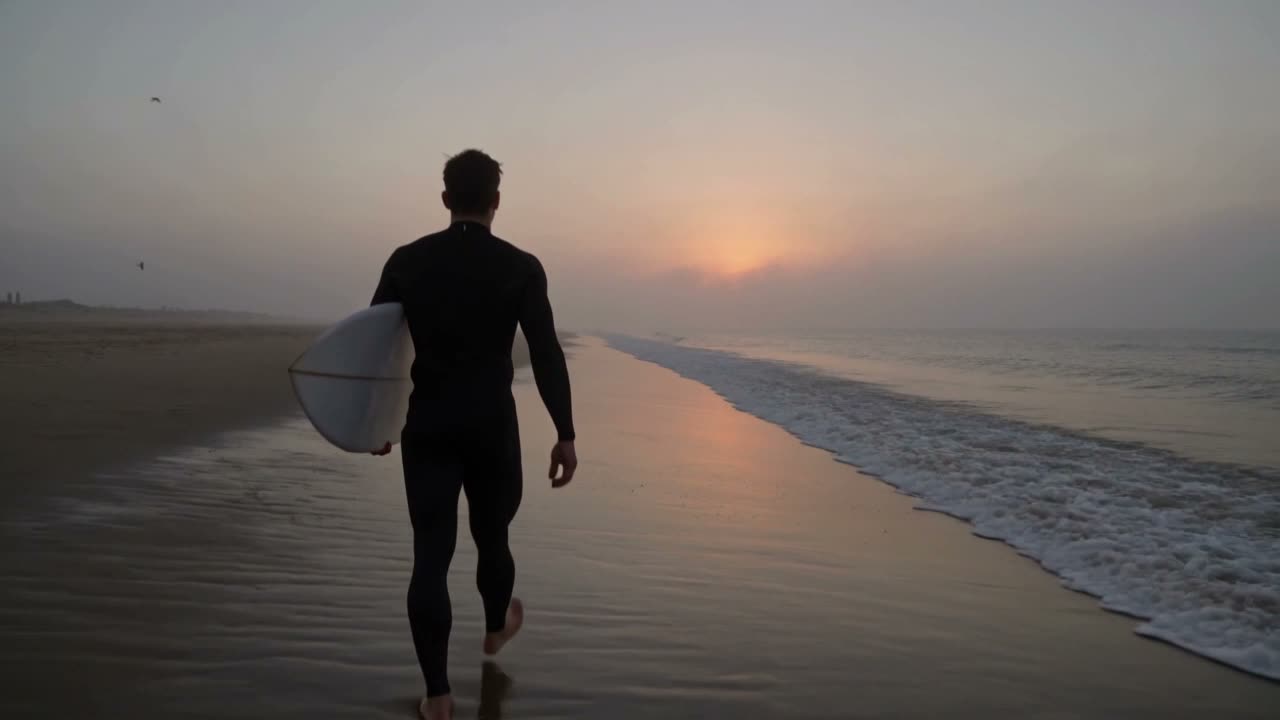 Input: the start frame.
Result. Image to video, 5 seconds, 720p.
Prompt: "The surfer slowly turns toward the camera and smiles as mist drifts past, gentle surf and gulls".
Elements: reference to video
Elements takes up to 10 reference images plus video references, and you point at them in the prompt with tags such as @Image1 and @Video1. Here one image supplies the character and one video supplies the movement.
@Image1: the character.
@Video1: the movement.
Result. Reference to video, 16:9, 5 seconds, 720p.
Prompt: "The character from @Image1 walks through a neon-lit night market, moving like @Video1, soft rain and crowd ambience".
Video to video
Video to video restyles or edits a source clip of 3 to 20 seconds. Say what to change and what to keep. The source here is the text-to-video clip from the top of this post.
Prompt: "Restyle @Video1 as a hand-painted watercolor animation, keep the motion and the sound".
How to prompt it
Start with one clear action. For text to video, name the subject, the setting, the camera move and the sound you want to hear. For image to video, say what should move and what should hold still. In Elements, say what each reference contributes, such as the character from the image or the movement from the video. For video to video, name what to change and what to keep.
Because the audio is generated with the picture, put sound in the prompt: surf, rain, crowd ambience. The clips above did that.
Specs at a glance
- Tools: text to video, image to video (start frame), Elements (reference to video) and video to video.
- Resolution: 720p.
- Duration: 3 to 20 seconds.
- Audio: native stereo audio, generated with the video.
- Text-to-video aspect ratios: 16:9, 9:16, 1:1 and 21:9.
- Elements: up to 10 images plus video references.
- Video to video: restyle or edit a 3 to 20 second source clip.
Credits depend on the duration you choose, and the estimate is shown in the app before you generate.
Frequently asked questions
What is Kling 4.0 Flash?
It is the fast version of Kling 4.0. It makes 720p video from 3 to 20 seconds with native stereo audio, and it is available in four Kolbo.AI tools.
Which tools does it work in?
Text to video, image to video, Elements (reference to video) and video to video.
Does it generate sound?
Yes. Stereo audio is generated natively with the video, so describe the sounds you want in your prompt.
How many references can I use in Elements?
Up to 10 images, plus video references.
What aspect ratios does text to video support?
16:9, 9:16, 1:1 and 21:9.
When should I use Kling 4.0 instead of Flash?
Use Flash to iterate quickly on 720p. Use the full Kling 4.0 model when you want its wider set of modes and 1080p output.
Kling 4.0 Flash is live now. Open it in Kolbo.AI and start with a prompt that names the camera and the sound.